Preview
For when you want to see it exactly as customers will. View it full screen with no editing marks, and download it right from there.
All done editing and wondering how it will really look? Before you download, check it exactly as your customers will see it.
- What's different? You see only the finished result — no selection marks or guides.
- Where do I open it? [Preview] on the right side of the top menu.
To check with Preview
![[Preview] at the far right of the top menu](/en/assets/screen-editor-where-preview-en.jpg)
- Click [Preview] on the right side of the top menu
- The whole screen switches to the preview.
- Scroll through the pages
- The pages run top to bottom in one continuous strip — exactly the order your customer sees.
- You can also zoom in and out with
− % +at the top right.
- If you've added any links, click them
- They really open. This is the place to check you didn't mistype an address.
- To download it as is, click [Download]
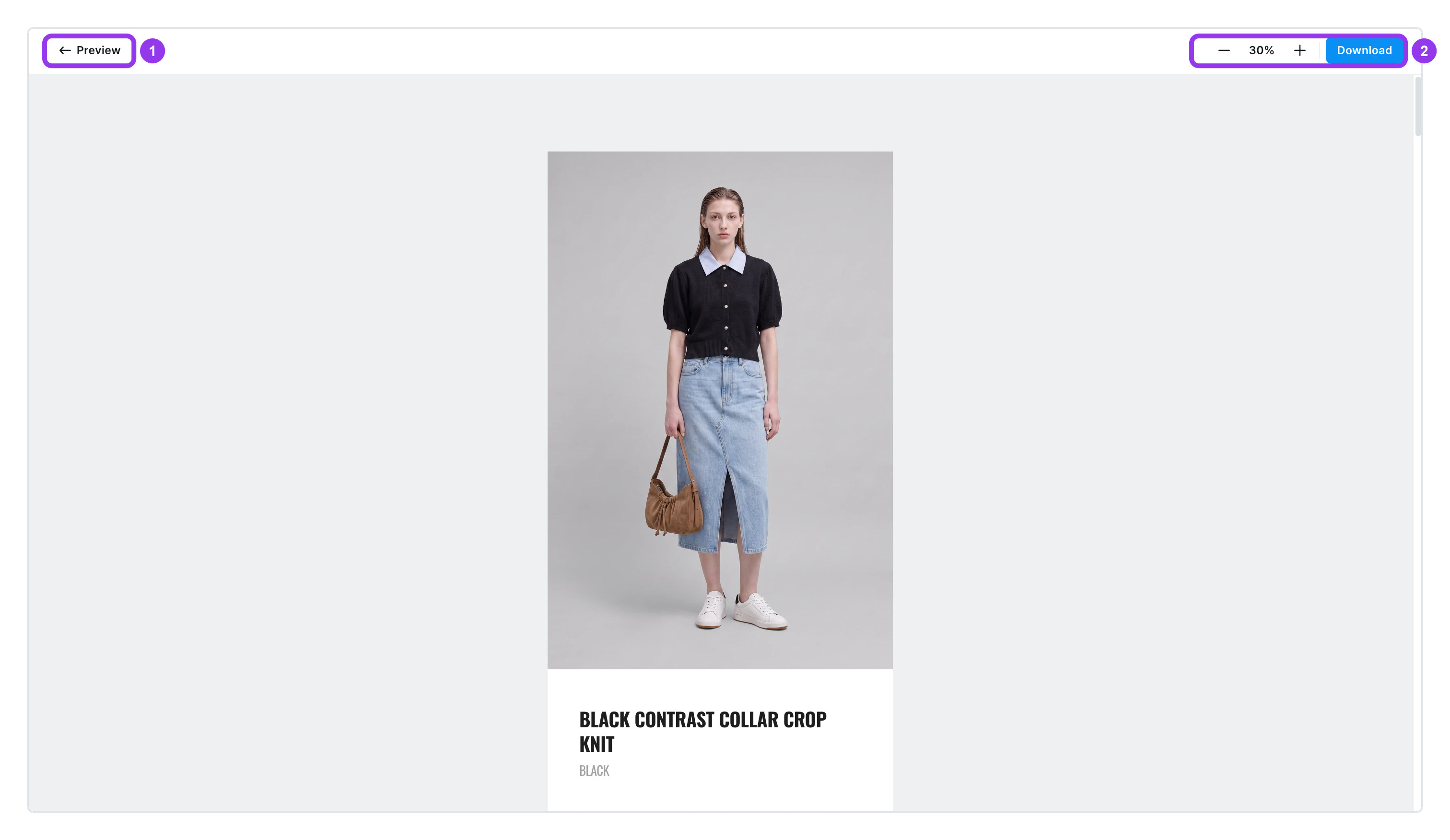
| No. | Item | What it does |
|---|---|---|
| 1 | [← Preview] | Goes back to the edit screen |
| 2 | − % + · [Download] | Zoom in and out, or download straight from here |
To go back to the edit screen, click [← Preview] at the top left.
info
If you choose Select directly in preview in the download window, you can pick just the pages you need by clicking them on this screen.